Setting Message Alert Tones
Setting Message Alert Tones
1. Click "Settings"

2. Click "User Settings"

3. Click "Message Alerts"

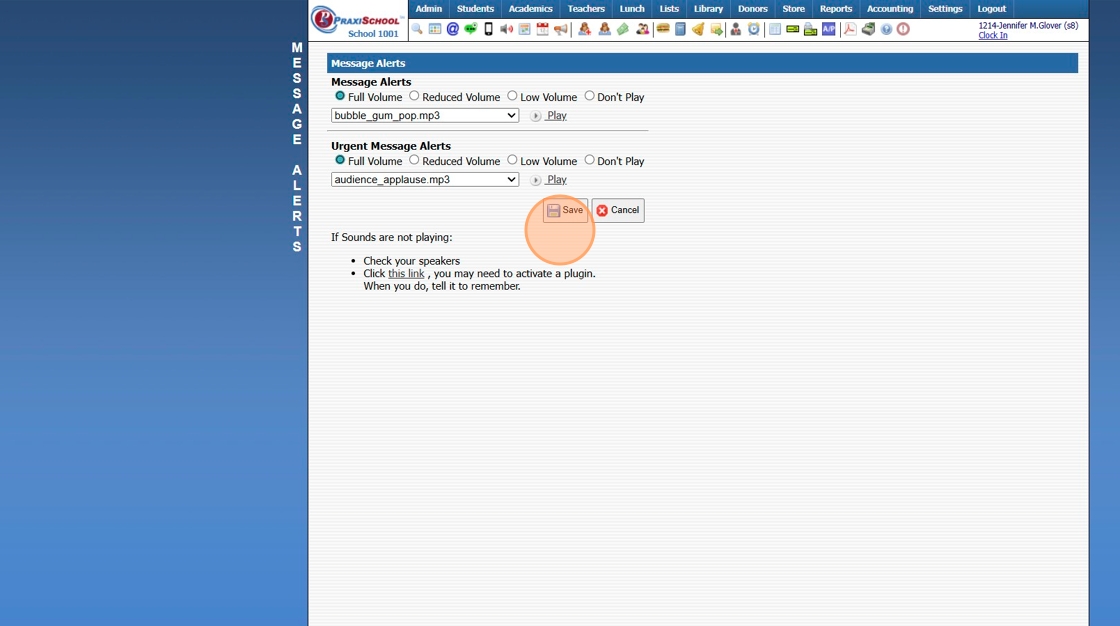
4. Select Volume Preference for Message Alerts

5. Select Message Alerts Sound Preference

6. Select Volume Preference for Urgent Message Alerts

7. Select Urgent Message Alerts Sound Preference

8. Click "Save"
6500.4.8
Related Articles
Setting Up Custom Attendance
Setting Up Custom Attendance 1. Select Custom Attendance Icon Tip: Custom Attendance Icon should be a simple 16 x 16 pixels image 2. Open PraxiSchool & Click "Admin" 3. Click "Resources" 4. Click "Resources" 5. Click "Add" 6. Enter Icon Name 7. ...Sending a Long Text Message
The Long Message feature can be used to send Text Messages that are longer than the allowed number of characters to avoid sending multiple text messages. 1. Click "Admin" 2. Click "Texting" 3. Click "Send Text Message" 4. Click "Add" 5. Enter the ...Heartland Declined ACH Message - Blacklist
Heartland Declined ACH Message - Blacklist 1. Click "Accounting" 2. Click "Electronic Payments" 3. Click "Heartland Transactions" 4. Select the non-successful transaction 5. [MessageDescription] => 233 - Transaction declined. Please contact the ...Sending Messages to Staff / Staff Groups
Sending Messages to Staff / Staff Groups 1. Click on PraxiSchool Icon to Open Messages Screen 2. Click the "+" Icon 3. Select "Staff" Toggle Sending a Message to a Single Staff Member 4. Tag Staff to Send Message To 5. Click "Send Message" 6. Enter ...Volunteer Hours Type: Setting Up Volunteer Hours
Volunteer Hours Type: Setting Up Volunteer Hours 1. Click "Admin" 2. Click "Volunteer" 3. Click "Hours Types" 4. Click "Add" 5. Enter Volunteer Hour Description 6. Enter Order Number (Optional) (If Order Number is not entered, items will appear in ...