Recycling Managed Documents
Recycling Managed Documents
1. Click "Admin"

2. Click "Manage Document"

3. Click "Recycle Bin"

Deleting in Batch
4. Tag Documents in Recycling Bin to Delete

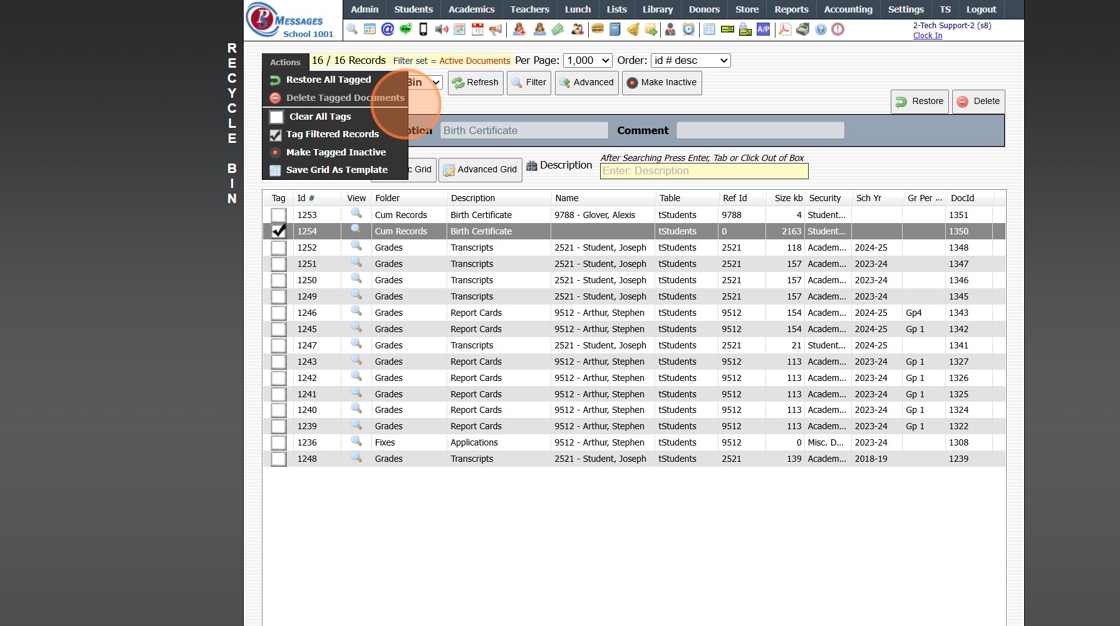
5. Click "Actions"

6. Click "Delete Tagged Documents"
Deleting Individual Documents
7. Select Document to Delete & Click "Delete"

1000.4.9
Related Articles
Session Close Tasks - Managed Docs: Empty Recycling Bin
1. Click "Admin" 2. Click "Manage Document" 3. Click "Recycle Bin" Deleting a Single Document 4. Select Document to Delete 5. Click "Delete" & Click "Ok" Deleting In Batch 6. Tag Documents to Delete 7. Click "Actions" 8. Click "Delete Tagged ...Restoring Recycled Documents
Restoring Recycled Documents 1. Click "Admin" 2. Click "Manage Document" 3. Click "Recycle Bin" Restoring in Batch 4. Tag Documents in Recycling Bin to Restore 5. Click "Actions" 6. Click "Restore All Tagged" Restoring Individual Documents 7. Select ...Documents - Misc Documents
1. Click "Admin" 2. Click "Manage Document" 3. Click "Misc docs" 4. Click "Add" 5. Enter the Description & Comment for the Misc Documents 6. Enter Notes for Information pertaining to Misc Documents 7. Click "Save" 8. Click the "Docs" tab 9. Click ...Emailing Student Documents
1. Click "Students" 2. Click "Students" 3. Select Student 4. Click the "Docs" Tab 5. Click Envelope Icon Next to Document to Email OR From the Email Screen All Documents or a Folder of Documents can be Emailed 6. Select Process Option 7. Edit/Enter ...Uploading Student Documents
1. Click "Admin" 2. Click "Manage Document" 3. Click "Upload Documents" 4. Select the "Security" 5. Select the "Student" 6. Select the "Folder" 7. Select the "Description" 8. Click "Choose File" & Select Document to Upload 9. Verify School Year 10. ...