UPDATE: Student Insurance Company & Policy Number Added to Student Contact Report
UPDATE: Student Insurance Company & Policy Number Added to Student Contact Report
1. Click "Students"

2. Click "Students"

3. Select Student

4. Click the "Medical" tab

5. Verify that Has Insurance is Check & Insurance Policy Information is entered

6. Click "Actions"

7. Click "Reports"

8. Click "Contact Sheets"

9. Select Print For option
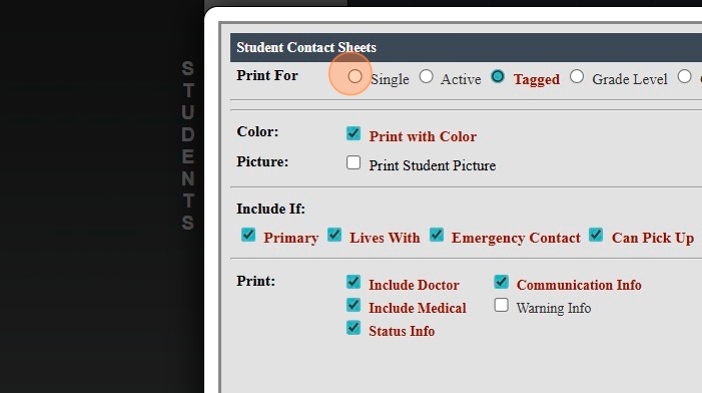
10. Check Print Option for "Include Doctor"

11. Click Print

New Feature
12. Insurance Policy Information Prints on Contact Sheet

13. 1500.4.24
Related Articles
Printing Student Parent Contact (A/R) Report
Printing Student Parent Contact (A/R) Report 1. Click "Reports" 2. Click "Parent Contacts (A/R)" 3. Select to Print by Homeroom Teacher, Grade Level or Class 4. Select All to Print for All Homeroom Teacher, Grade Level or Class 5. Report can be ...Updating Student Pictures on Report Cards
Updating Student Pictures on Report Cards Updating Student Pictures, if Student Pictures are added after Report Cards have already been created 1. Click "Academics" 2. Click "Grades Reports" 3. Click "Print Report Cards" 4. Select to Update by ...Student Contact Sheet w/Medical Information
1. Click "Students" 2. Click "Students" 3. Select Student 4. Click "Actions" 5. Click "Report" 6. Click "Contact Sheets" 7. Select Print For Option 8. Select Print Options 9. Select Include & Print Options 10. Click "Print" 11. Student Contact Sheet ...Accessing Student Family Contact Information from the Student File
Accessing Student Family Contact Information from the Student File 1. Log into PraxiSchool 2. Click "Students" 3. Click "Students" and Select Student 4. Click "Actions" 5. Click "Family Contacts" 6. The Selected Student's Family Contacts Report will ...Update Student's Grade Level on Transcripts by Report Card or Course Grade Level
Update Student's Grade Level on Transcripts by Report Card or Course Grade Level 1. Click "Academics" 2. Click "Transcripts" 3. Click "Transcript Grades" 4. Filter & Tag Transcript Grades to Update 5. Click "Actions" 6. Click "Update Grade Level" 7. ...