Pre-Register Students to Next Grade Level Using the Promotion Wizard
Pre-Register Students to Next Grade Level Using the Promotion Wizard
1. Log into PraxiSchool

2. Click "Academics"

3. Click "Grades Tasks"

4. Click "Promote Students"
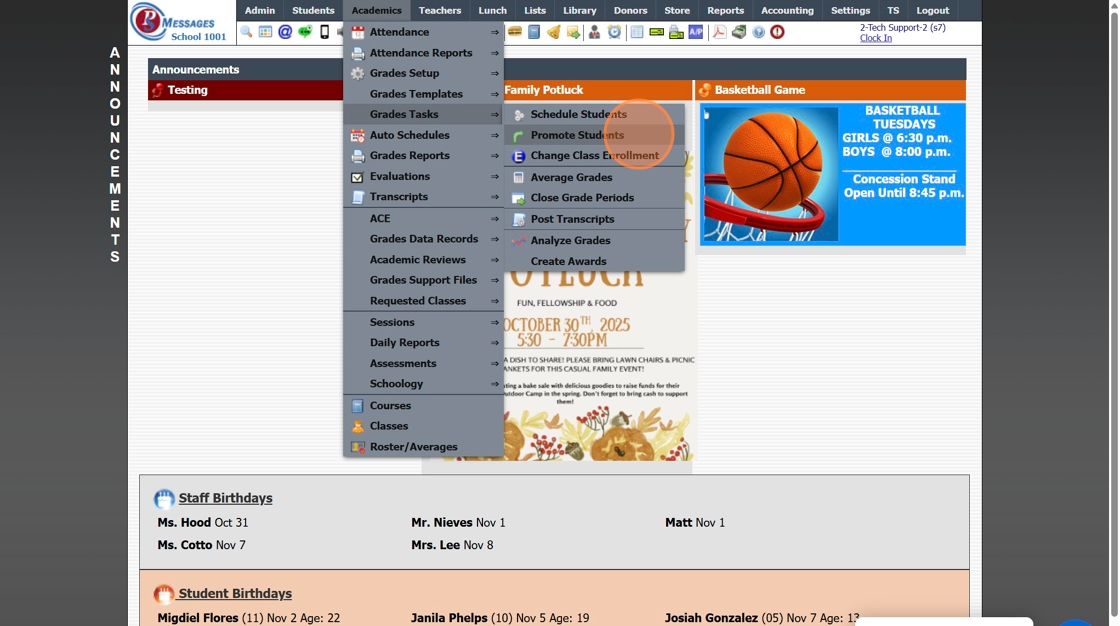
5. Set the Effective Date

6. Select Grade Level From and Grade Level To

7. Select "Next Session"

8. Check the box for "Create Record in Enrollment History"

9. Click "Select All"

10. Click "Process"

2000.4.2
Related Articles
Enrolling Pre-Registered Students in Next Years Classes by Grade Level
1. Click "Academics" 2. Click "Grades Tasks" 3. Click "Schedule Students" 4. Select Students Enrolled In "Next Year" 5. Select Next School Year under Classes For 6. Select Grade Level under Select Students 7. Click "Load Students" 8. Select Grade ...Session Close Tasks - Enrollment: Pre-Registering Existing Student Using the Promote Students Wizard
1. Click "Academics" 2. Click "Grades Tasks" 3. Click "Promote Students" 4. Select the Effective Date 5. Select Grade Levels to Promote 6. Click "Next Session" to Pre-Register for Next Year 7. Click "Create Record in Enrollment History" to add the ...Scheduling Students into Classes by Grade Level
Scheduling Students into Classes by Grade Level 1. Log into PraxiSchool 2. Click "Academics" 3. Click "Grades Tasks" 4. Click "Schedule Students" 5. Current Year is the Default Option for Students Enrolled In (Select Summer or Next Year if scheduling ...Entering Attendance in the Attendance Wizard
Entering Attendance in the Attendance Wizard 1. Click "Academics" 2. Click "Attendance" 3. Click "Attendance Wizard" Entering by Grade Level(s) 4. Select Date to Enter Attendance For 5. Select Grade From and Grade To 6. Click "Load Detail" 7. Select ...How to Add a New Student in the Student Wizard (T)
How to New Student in Student Wizard (T) 1. Click "Students" 2. Click "Student Wizard (T)" 3. Click "New Student" 4. Add the Student's Name 5. Add the Goes By Name 6. The other fields and tabs are available for you to use to use but they are optional ...