Process Auto Billing with Emailed Invoices
Process Auto Billing with Emailed Invoices
1. Log into PraxiSchool
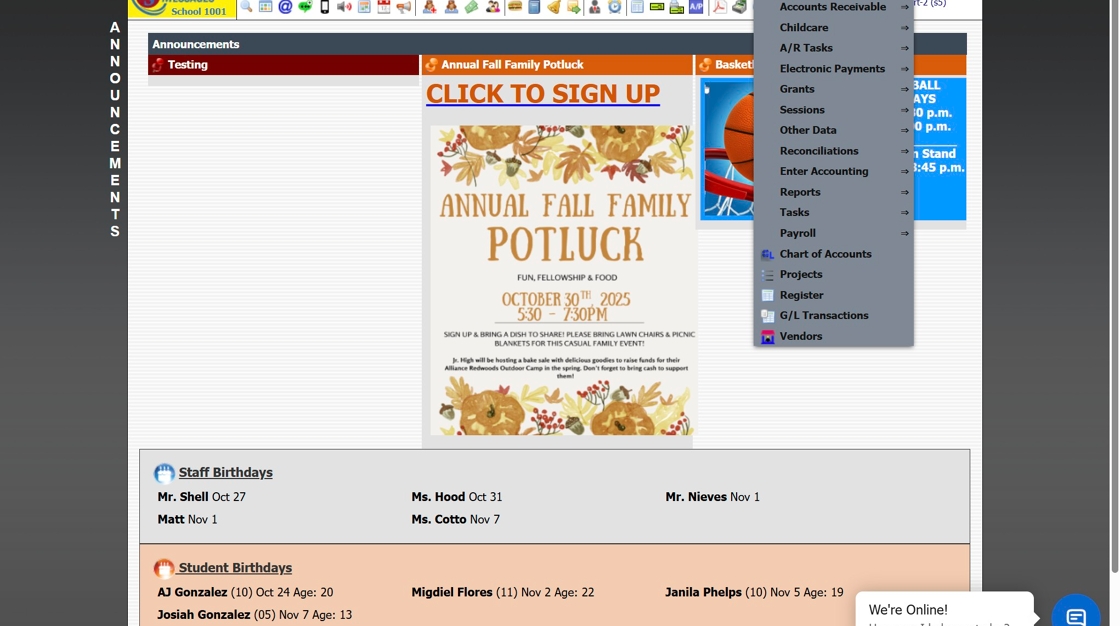
2. Click "Accounting"

3. Click "A/R Tasks"

4. Click "Auto Billing"

5. Set "Auto Bill Through Date"

6. Check box for "Print/Email Invoices"

7. Click "Process Auto Billing" and Click "Ok"

8. Check box for "Email to: A/R Email and/or A/R Alt Email"

9. Click "Process Email"

6000.3.2
Related Articles
Batch Billing a Transaction Item to Student Accounts
How to Batch Bill a Transaction to Student Accounts 1. Log into PraxiSchool 2. Click "Accounting" 3. Click "A/R Tasks" 4. Click "Batch Billing" 5. Click the "Students" field. 6. Select the "Grade " option. 7. Select the Grade Level(s) 8. Click "Load ...Charging Student Activities to Student Billing Accounts
Charging Student Activities to Student Billing Accounts 1. Click "Students" 2. Click "Students" 3. Tag Students to Bill Activities Funds 4. Click "Actions" 5. Click "Other Actions" 6. Click "Charge Student Activities" 7. Select to Process for Active ...Adding Batch Contracts to Student Billing Accounts
Adding Batch Contracts to Student Billing Accounts Tip: Tip! All Contract Templates must be set up prior to Batch Adding. Only contracts that have a set dollar amount can be added in the batch process. The NOW financing option in Contract Templates ...Online Forms Auto Start & End Dates
Online Forms Auto Start & End Dates 1. Click "Admin" 2. Click "Online Forms" 3. Click "Forms" 4. Select "Styles & Functionality" tab 5. Enter Auto Start & End Date and Time 1000.6.4Students: Viewing Billing Contracts
Students: Viewing Billing Contracts 1. Click "Students" 2. Click "Students" 3. Select Student 4. Click "A/R" tab 5. Summary - Default View View Contract Amounts by Billing Frequency 6. Detail View View Contract Details (Comment, General Ledger ...