Printing My Schedule (By Class)
Printing My Schedule (By Class)
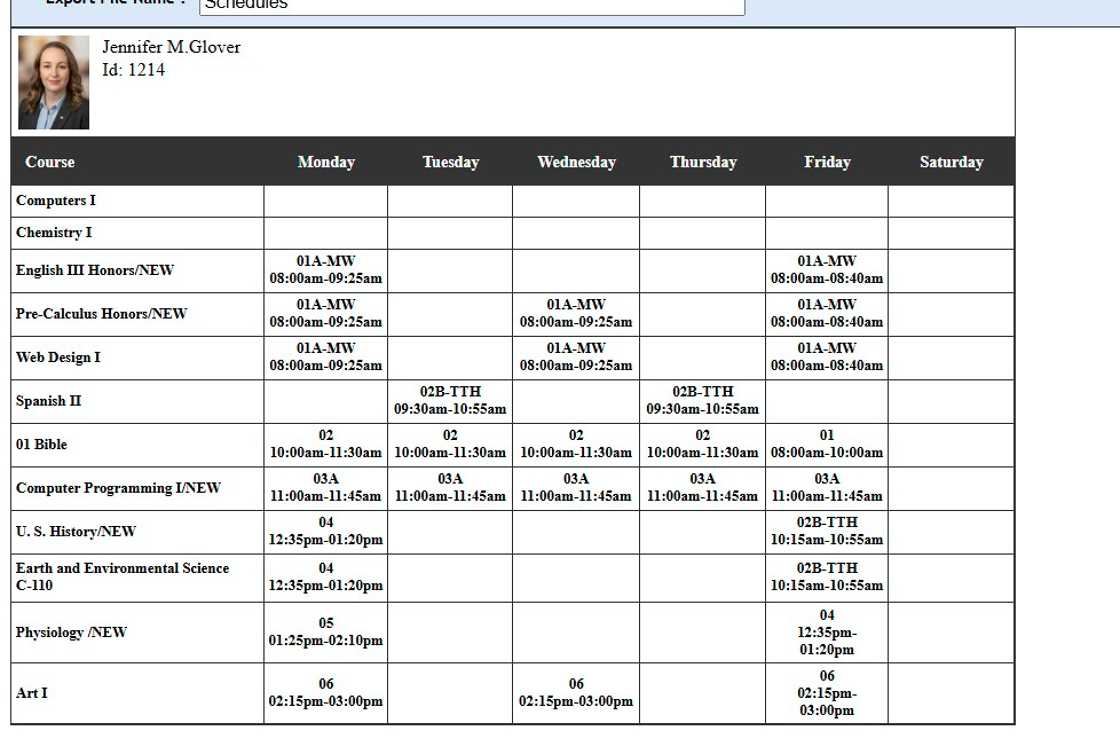
1. Click "Settings"

2. Click "User Settings"

3. Click "My Schedule (Class)"

4. Schedule can be Printed, Emailed or Saved to a PDF
6500.4.4
Related Articles
Printing My Schedule (By Class Period)
Printing My Schedule (By Class Period) 1. Click "Settings" 2. Click "User Settings" 3. Click "My Schedule (Period)" 4. Schedule can be Printed, Emailed or Saved to a PDF 6500.4.3Printing a Student Schedule from the Student File
1. Click "Students" 2. Click "Students" 3. Select the Student 4. Click the "Classes" Tab 5. Click "Print" Printing the Student Schedule by Class Period 6. Click "Schedule/Period" 7. The Student's Schedule will Print based on the Period & Day of the ...Printing All Class Rosters
1. Click "Academics" 2. Click "Grades Tasks" 3. Click "Schedule Students" 4. Select the Grade From & the Grade To 5. Click "Load Classes" 6. Click "Select All" or Select Classes to Print For 7. Click "Rosters"Printing Class Averages
Printing Class Averages 1. Click "Academics" 2. Click "Grades Reports" 3. Click "Class Averages" 4. Select from School Year Dropdown 5. Select the Grade Period/Quarter Option: (GP1, GP2, GP3, GP4, SEM1, SEM2 or Annual) 6. Select Rounding Option: (0, ...Printing a Class Roster from Classes
1. Click "Academics" 2. Click "Classes" 3. Click "Students" tab 4. Click "Print Roster" 5. Class Roster will Populate for Printing 2000.13.12