Printing Class Averages

Printing Class Averages

Printing Class Averages


1. Click "Academics"

2. Click "Grades Reports"

3. Click "Class Averages"

4. Select from School Year Dropdown

5. Select the Grade Period/Quarter Option:

(GP1, GP2, GP3, GP4, SEM1, SEM2 or Annual)

6. Select Rounding Option:

(0, 1, 2, 3, 4, 5, 6)

Select Student's Enrollment Status to Include

7. Select Enrolled for Classes that are currently marked as "Enrolled"

8. Select Completed for Classes that are already marked as "Completed"

9. Select Both to Include both Enrolled and Completed Classes

Select the Item to Average By

10. Click "Class" to Average by Class

11. Click "Teacher" to Average by Teacher.

12. Click "Grade" to Average by Grade Level

13. Click "Course" to Average By Courses

Filtering Grades to Average

14. Click Class and Type the Class to be Averaged

15. Click "Teacher" and Type the Teachers Name to be Averaged

16. Click "Grade" and Select the Grade Levels to be Averaged

17. Click "Course" and Type the Course to be Averaged
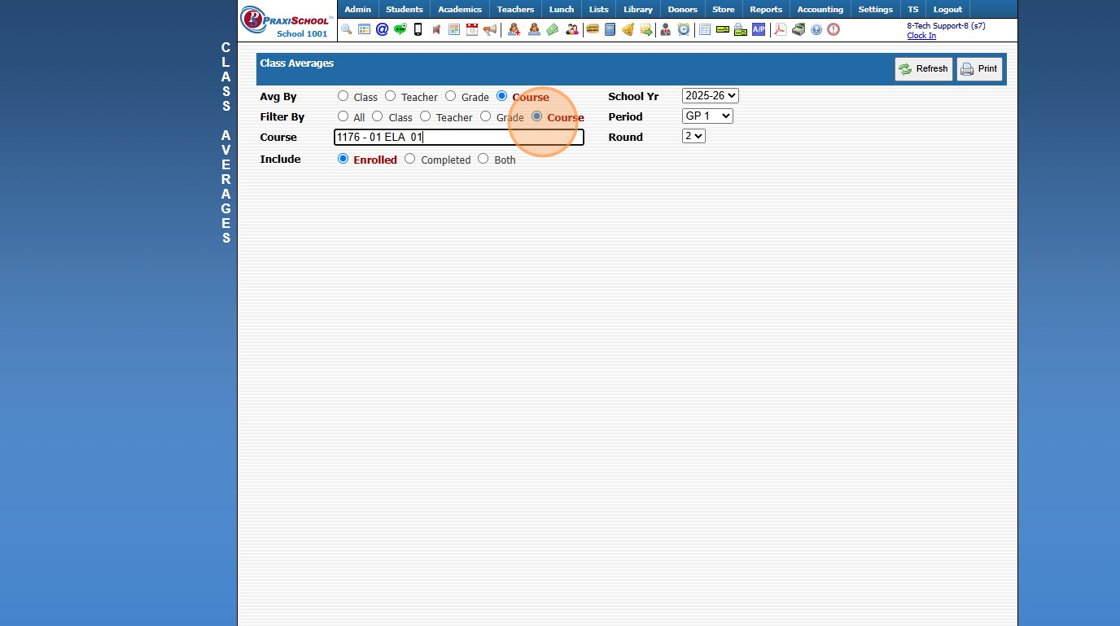
18. Click "All" to Average ALL Classes, Grade Levels, Teacher, Grade or Course

19. Click Print


2000.6.3
    • Related Articles

    • Printing My Schedule (By Class)

      Printing My Schedule (By Class) 1. Click "Settings" 2. Click "User Settings" 3. Click "My Schedule (Class)" 4. Schedule can be Printed, Emailed or Saved to a PDF 6500.4.4
    • Printing My Schedule (By Class Period)

      Printing My Schedule (By Class Period) 1. Click "Settings" 2. Click "User Settings" 3. Click "My Schedule (Period)" 4. Schedule can be Printed, Emailed or Saved to a PDF 6500.4.3
    • Printing Student Family Contacts Report

      Printing Student Family Contacts Report 1. Click "Reports" 2. Click "Family Contact" 3. Select to Print by Homeroom Teacher, Grade Level or Class 4. Select All to Print for All Homeroom Teacher, Grade Level or Class 5. Report can be printed for one ...
    • Printing Student Family Contacts Report

      Printing Student Family Contacts Report 1. Click "Reports" 2. Click "Family Contact" 3. Select to Print by Homeroom Teacher, Grade Level or Class 4. Select All to Print for All Homeroom Teacher, Grade Level or Class 5. Report can be printed for one ...
    • Printing Student Sign In Sheets

      Printing Student Sign In Sheets 1. Log into PraxiSchool 2. Click "Students" 3. Click "Students" 4. Click "Actions" 5. Click "Reports" 6. Click "Sign In Sheets" 7. Select Report Type (Barcode Report or Daily Sheet) 8. Select Order By Option (Grade, ...