Implementing Google Classroom
Implementing Google Classroom
1. Click "Teachers"

2. Click "Google Classroom" & Select Google Account to Link

3. Click the "Help" tab to Access the Google Classroom Help for Implementation

4. Click "Google Classroom Interface" to View Interface Information

5. Click "Classes Help" for Help with Creating / Linking Classes

6. Click "Staff Help" for Help with Inviting another Teacher(s) to a Class

7. Click "Students Help" for Help with Inviting / Linking Students

8. Click "Assignments Help" for Help with Creating / Linking Assignments
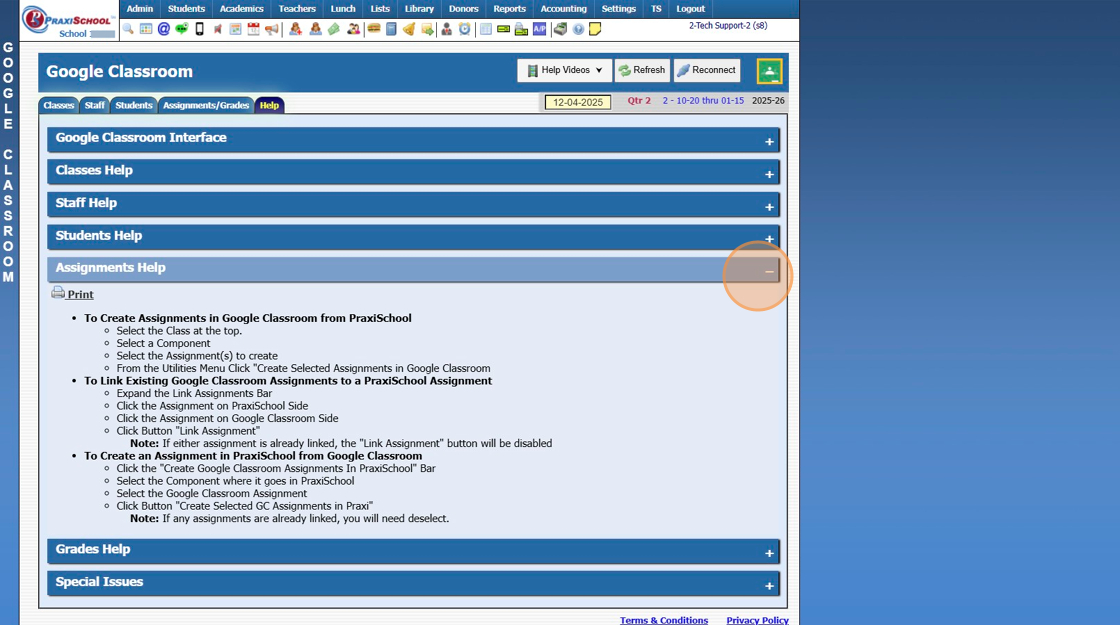
9. Click "Grades Help" for Help with Transferring Grades

10. Click "Special Issues" for Help with Other Items

2500.2.1
Related Articles
Unenrolling a Google Classroom Student
Unenroll a Google Classroom Student 1. Click "Teachers" 2. Click "Google Classroom" 3. Click "Students" 4. Select the Praxi Class 5. Highlight Google Classroom Student 6. Click "Utilities ⮟" 7. Click "Unenroll Selected GC Student" 8. Click OK. ...Creating Google Classroom from PraxiSchool
How to Create a Google Classroom Class from PraxiSchool 1. Go to Teachers/Google Classroom 2. Click "Classes" 3. Check Class you want to create in Google Classroom 4. Click "Utilities" 5. Click "Create GC Class" 6. Switch to Google Classroom and ...Unlinking PraxiSchool Class with Google Classroom
Unlinking PraxiSchool Class with Google Classroom 1. Click "Teachers" 2. Click "Google Classroom" 3. Check Praxi class to unlink. 4. Click "Utilities" 5. Click "Clear Selected Links" 2500.2.5Copying PraxiSchool Assignments to Google Classroom
Create PraxiSchool Assignments in Google Classroom 1. Click "Teachers" 2. Click "Google Classroom" 3. Select the Praxi Class 4. Click "Assignments/Grades" 5. Check all the assignments that need to be created in Google Classroom 6. Click "Create ...Additional Help and Troubleshooting Google Classroom Issues
Additional Help and Troubleshooting Google Classroom Issues 1. Click "Teachers" 2. Click "Google Classroom" 3. Click "Help Videos" to display help videos. 4. Select "Help" tab to display additional help topics 5. Click Plus sign to display options in ...