Generating Blank Grades Report
Generating Blank Grades Report
Blank Grades - Grade Book Grades that the Yellow Bar was clicked to Add the Weight but Grades have not been entered.
1. Click "Teachers"
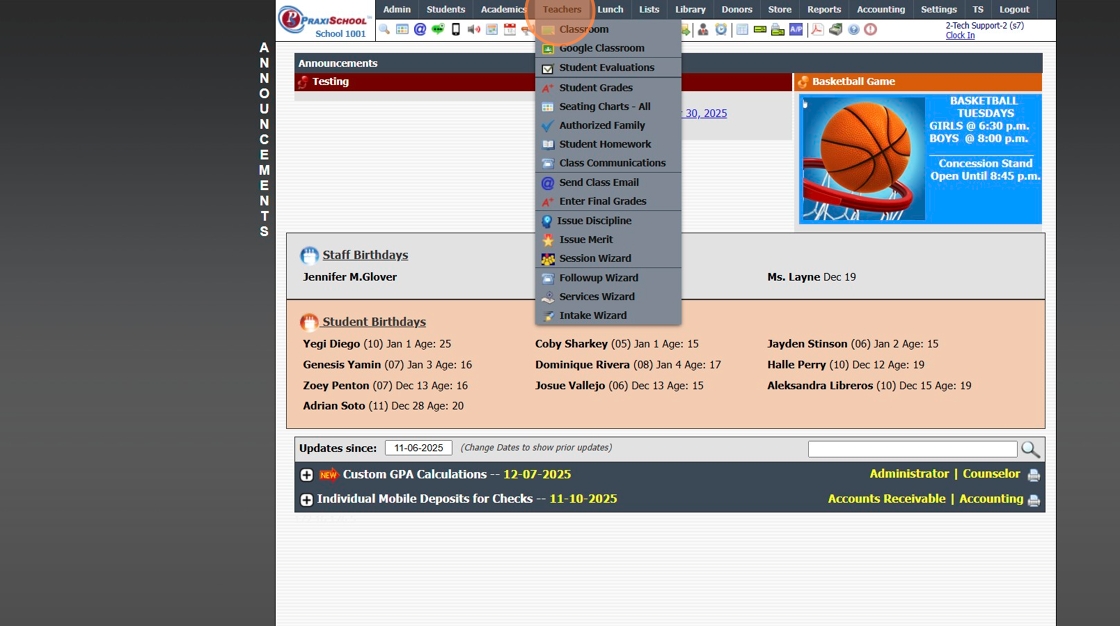
2. Click "Classroom"

3. Click "Reports"

4. Click "Blank Grades"

5. Select "All My Classes" (Default) or "Current Class"

6. Click "Process Report"

7. Report can be Printed, Emailed or Saved to a PDF

8. 2500.1.35
Related Articles
Generating Grade Reports
Generating Grade Reports Grade Reports for Incomplete Grades, Blank Grades (Not Marked Incomplete) and Zero Weight. 1. Log into PraxiSchool 2. Click "Academics" 3. Click "Grades Reports" 4. Click "Incomplete Grades" Incomplete Grades Report 5. Select ...Generating Incomplete Grades Report
Generating Incomplete Grades Report Incomplete Grades - Grade Book Grades have been marked Incomplete. 1. Click "Teachers" 2. Click "Classroom" 3. Click "Reports" 4. Click "Incomplete Grades" 5. Select "All My Classes" (Default) or "Current Class" 6. ...Generating Zero Weight Grades Report
Generating Zero Weight Grades Report Zero Weight Grades - Grade Book Grades that have been entered, but the Yellow Bar has not been clicked to Add the Weight and Mark the Assignment Visible. 1. Click "Teachers" 2. Click "Classroom" 3. Click "Reports" ...Classroom Incomplete Grades Report
Classroom Incomplete Grades Report 1. Log into PraxiSchool 2. Click "Teachers" 3. Click "Classroom" 4. Select Class 5. Click "Reports" 6. Click "Incomplete Grades" (Incomplete Grades Report shows All Student Assignments marked Incomplete) 7. Click ...Classroom Detail Grades Report
Classroom Detail Grades Report 1. Log into PraxiSchool 2. Click "Teachers" 3. Click "Classroom" 4. Select Class 5. Click "Reports" 6. Click "Detail Grade Book" (Detail Grade Book Report shows All Student's Assignment Grades for Class) 7. Click ...